This is part 3 of the Secure Terraform series. You can read the series of articles here:
- Secure Terraform - Part 1 - tfsec
- Secure Terraform - Part 2 - tfsec customization
- Secure Terraform - Part 3 - terrascan
- Secure Terraform - Part 4 - checkov
- Secure Terraform - Part 5 - terraform state
Introduction#
Terrascan is another great tool for terraform security from tenable.
Terrascan is an open-source static code analysis tool for security compliance of your Infrastructure as Code (IaC). It has rules for various platforms, including Kubernetes, Dockerfile, AWS, Azure, GCP, and Terraform. It is developed in GoLang and has a CLI, API, and Jenkins plugin. Terrascan can be used to scan your IaC files for security vulnerabilities and policy violations. It can help you identify security issues before you deploy your code, and it can also help you enforce compliance policies.
You can see a lot of relevant documentation at: runterrascan.io.
Terrascan CLI#
In addition to tfsec, there is another static code analysis tool for Terraform called Terrascan. Terrascan is open source and supported by tenable.
You can download the Terrascan CLI from the official GitHub repository: https://github.com/accurics/terrascan/releases.
It is available for Windows, macOS, Linux, and docker.
Once you have the Terrascan CLI installed, you can use it to scan your Terraform code. Terrascan comes with a number of pre-built policies that you can use. Policies define a set of rules that you want to enforce on your Terraform code. You can also create your own custom policies.
To scan your Terraform code using Terrascan, navigate to the root directory of your project and run the following command:
terrascan scan
By default, Terrascan will scan all Terraform files in the current directory and its subdirectories. You can specify a different directory by passing the --path option:
terrascan scan --path=path/to/terraform/files
Terrascan will output a list of violations that it found in your code. Each violation will have a rule ID, a description, and a severity level. The severity level can be either HIGH, MEDIUM, or LOW. The output will also include the filename, line number, and column number where the violation was found.
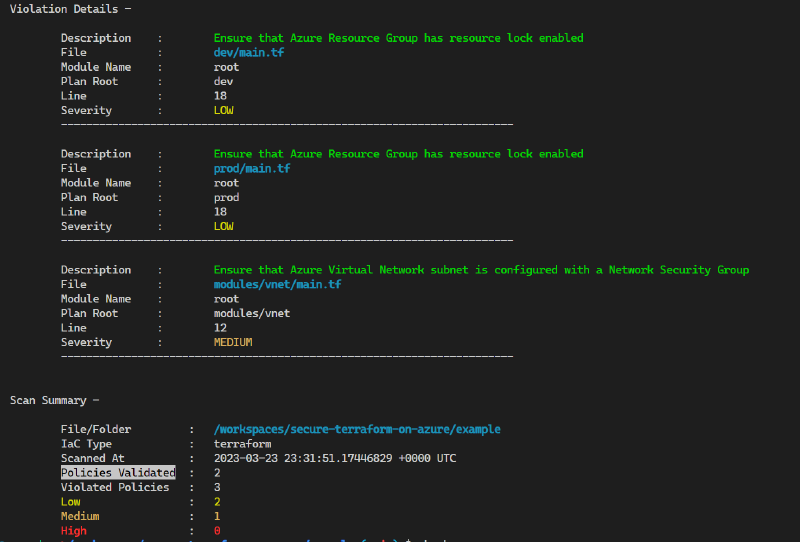
You can specify a different output format using the --format option. Terrascan supports a number of output formats, including JSON, YAML, and JUnit. Here’s an example of how to output the results in JSON format:
terrascan scan --format=json > output.json
You can also specify a policy path using the --policy-path option. By default, Terrascan will use the policies that are included with the tool. However, you can also use your own custom policies by specifying a policy path:
terrascan scan --policy-path=path/to/policies
Terrascan also supports scanning remote Terraform modules. You can use the --remote option to scan a remote module:
terrascan scan --remote=github.com/tenable/terrascan
Terrascan supports a number of other options and flags that you can use. You can view the full list of options by running terrascan help scan.
Terrascan in CI/CD Pipelines#
Integrating Terrascan into your CI/CD pipeline is an essential step in ensuring the security of your infrastructure. By adding Terrascan to your pipeline, you can automatically scan your Terraform code for security vulnerabilities and policy violations every time you commit changes.
Here’s an example of how to integrate Terrascan into a GitHub Actions pipeline:
name: terrascan
on:
  push:
    branches:
      - main
  pull_request:

permissions:
  checks: write
  pull-requests: write

jobs:
  terrascan_job:
    runs-on: ubuntu-latest
    name: terrascan-action
    steps:
      - name: Checkout repository
        uses: actions/checkout@v2
      - name: Run Terrascan
        id: terrascan
        uses: tenable/terrascan-action@main
        with:
          iac_type: 'terraform'
          #iac_version: 'v14'
          #policy_type: 'azure'
          only_warn: false
          #scm_token: ${{ secrets.ACCESS_TOKEN }}
          verbose: true
          sarif_upload: true
          #non_recursive:
          #iac_dir: demos
          #policy_path:
          #skip_rules:
          #config_path:
          #find_vulnerabilities:
          #webhook_url:
          #webhook_token:
In this example, the workflow is triggered on push and pull_request events for the main branch. The workflow checks out the repository, sets up Go, installs Terrascan, and then runs a scan on the specified Terraform files.
Custom Policies and Rules#
Terrascan allows you to create custom policies and rules to enforce specific security and compliance requirements. You can write custom policies in Rego, a high-level declarative language used by the Open Policy Agent (OPA) project.
To create a custom policy, follow these steps:
Create a new directory for your custom policies, e.g., custom_policies.
Inside the custom_policies directory, create a new Rego file for your custom rule, e.g., my_custom_rule.rego.
Write your custom rule using the Rego language. Refer to the OPA documentation for guidance on writing Rego policies.
package accurics

azureKeyVaultSoftDeleteRetentionDays[resource.id] {
    resource := input.azurerm_key_vault[_]
    resource.type == "azurerm_key_vault"
    properties := resource.config
    properties.soft_delete_retention_days < 14
}
Create the Rule json metadata file
{
  "name": "azureKeyVaultSoftDeleteRetentionDays",
  "file": "azureKeyVaultSoftDeleteRetentionDays.rego",
  "policy_type": "azure",
  "resource_type": "azurerm_key_vault",
  "template_args": {},
  "severity": "MEDIUM",
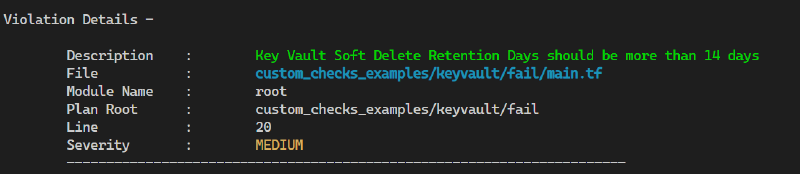
  "description": "Key Vault Soft Delete Retention Days should be more than 14 days",
  "category": "Data Protection",
  "version": 1,
  "id": "AC_AZURE_1000"
}
Once you have created your custom policy, you can use the
--policy-pathoption with Terrascan to include your custom policies in the scan:terrascan scan -p custom_policies/ -p ~/.terrascan/pkg/policies/opa/regoIf there are errors, you should get output like the following:
Conclusion#
Terrascan is a powerful tool that can help you improve the security and compliance of your Terraform code. By integrating Terrascan into your development process, including your CI/CD pipeline and using it alongside your code editor, you can catch potential security vulnerabilities and policy violations early on.
With its support for custom policies, Terrascan allows you to tailor its scanning capabilities to meet your organization’s specific requirements.
In conclusion, using tools like Terrascan, alongside others like tfsec, is an essential part of maintaining a secure and compliant infrastructure in a world increasingly reliant on Infrastructure as Code.