This is part 2 of the Secure Terraform series. You can read the series of articles here:
- Secure Terraform - Part 1 - tfsec
- Secure Terraform - Part 2 - tfsec customization
- Secure Terraform - Part 3 - terrascan
- Secure Terraform - Part 4 - checkov
- Secure Terraform - Part 5 - terraform state
Introduction#
In the previous article, we discussed tfsec, a static code analysis tool for Terraform. We also learned how to use it in VSCode and GitHub Actions to scan our Terraform code. We learned how to override the severity of rules. In this article, we will learn how to customize the rules and add our own rules.
Customizing tfsec Rules#
Tfsec allows you to customize the rules that are used to scan your Terraform code. You can do this by creating a file ending in _tfchecks.json or _tfchecks.yaml in the .tfsec folder in the root of project. You can also put these files in a different folder and pass the option --custom-check-dir or --custom-check-url to the tfsec command. This is covered in the documentation: https://aquasecurity.github.io/tfsec/v1.28.1/guides/configuration/custom-checks/.
The documentation references a tool called tfsec-checkgen that you can install. This tool will validate your check file or help perform tests to ensure that it is valid for use with tfsec. I found that the tool helped me create and validate checks but not run the test-check action.
In this post, we will take a look at how to create a few different custom rules. The first rule we’ll work on is for a required tag for our Azure resources. There is an example of this in the tfsec documentation, but its for AWS.
---
checks:
  - code: CUS001
    description: Custom check to ensure the CostCentre tag is applied to EC2 instances
    impact: By not having CostCentre we can't keep track of billing
    resolution: Add the CostCentre tag
    requiredTypes:
      - resource
    requiredLabels:
      - aws_instance
    severity: ERROR
    matchSpec:
      name: tags
      action: contains
      value: CostCentre
    errorMessage: The required CostCentre tag was missing
    relatedLinks:
      - http://internal.acmecorp.com/standards/aws/tagging.html
Lets look at my Azure example and discuss the tweaks and how to use it.
---
checks:
  - code: tags-resources
    description: Custom check to ensure the CostCenter tag is applied to Azure Resources
    impact: By not having CostCenter we can't keep track of billing
    resolution: Add the CostCenter tag
    requiredTypes:
      - resource
    requiredLabels:
      - azurerm_subscription
      - azurerm_resource_group
      - azurerm_linux_web_app
      - azurerm_windows_web_app
      - azurerm_storage_account
      - azurerm_service_plan
      - azurerm_app_service
    severity: HIGH
    matchSpec:
      name: tags
      action: contains
      value: CostCenter
    errorMessage: The required CostCenter tag was missing
    relatedLinks:
      - https://learn.microsoft.com/en-us/azure/cloud-adoption-framework/ready/azure-best-practices/resource-tagging
I’ve changed the name to tags-resources to make it more descriptive. I’ve also changed the requiredLabels to include the resources I want to check for the tag. This rule will only trigger on the resource types listed under requiredLabels. I’ve also changed the severity to HIGH. I’ve also added a link to the Azure Best Practices for Resource Tagging.
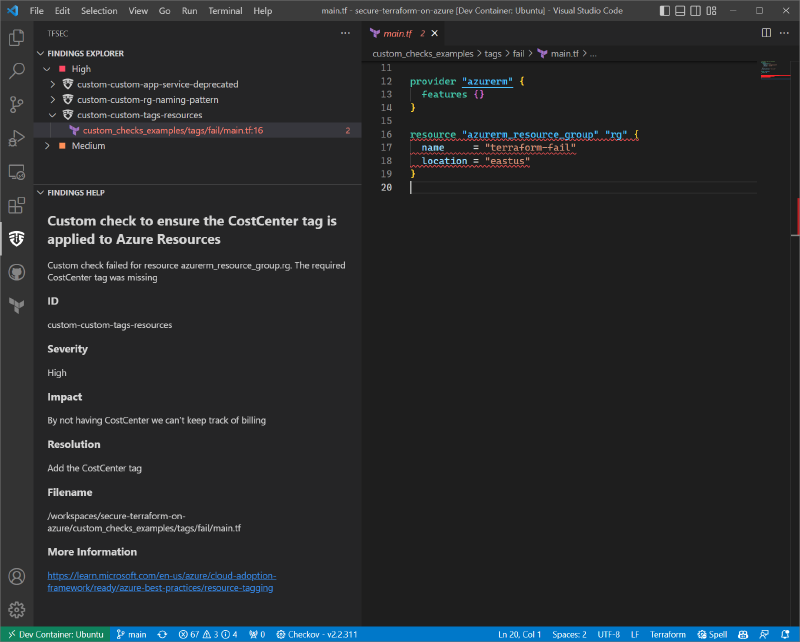
This is saved to .tfsec/custom_tfchecks.yaml. The tfsec vscode extension we installed before will automatically pick up the new rule. We can see it highlighting the code with an issue and showing up in the results screen.
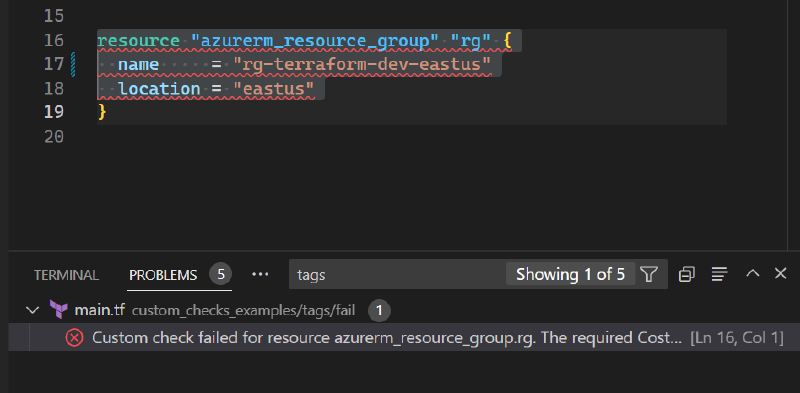
Issues also show up as problems at the bottom of the screen for you to see, click on, and navigate to the right code section.
A Custom Rule for Naming#
Let’s try something a little more complex. We can try to enforce a naming scheme for our resources. I want to enforce a naming scheme that all resource groups must follow a pattern of rg-app-env-region. This will help us identify which resources belong to which applications or environments. This is a great way to enforce a naming scheme and keep things organized.
- code: rg-naming-pattern
  description: Custom check to check resource group naming
  impact: resource groups should be named consistently
  resolution: use the pattern rg-app-env-region
  requiredTypes:
    - resource
  requiredLabels:
    - azurerm_resource_group
  severity: HIGH
  matchSpec:
    name: name
    action: regexMatches
    value: '^rg-[a-zA-Z]+-[a-zA-Z]+-[a-zA-Z]+'
  errorMessage: improperly named resource group
  relatedLinks:
    - https://learn.microsoft.com/en-us/azure/cloud-adoption-framework/ready/azure-best-practices/resource-naming
This rule, only checks against resource groups as identified by the requiredLabels property containing azurerm_resource_group. The matchSpec uses the regexMatches action. I am able to provide my regular expression and the error message.
There are a bunch of provided check actions that you can use to develop your custom checks.
Custom Checks for Deprecated Resources#
Tfsec also allows you to create custom checks for deprecated resources. This is a great way to keep up with the latest changes in Terraform and Azure. I’ve created a custom check for the deprecated azurerm_app_service resource. This resource has been deprecated in favor of azurerm_linux_web_app and azurerm_windows_web_app. I’ve created a custom check to warn us when we use the deprecated resource.
- code: app-service-deprecated
  description: Custom check to warn on deprecated app service
  impact: using deprecated app service resource instead of azurerm_linux_web_app or azurerm_windows_web_app
  resolution: Use azurerm_linux_web_app or azurerm_windows_web_app
  requiredTypes:
    - resource
  requiredLabels:
    - azurerm_app_service
  severity: WARN
  matchSpec:
    name: azurerm_app_service
    action: isPresent
  errorMessage: Using a deprecated resource - azurerm_app_service
  relatedLinks:
    - https://registry.terraform.io/providers/hashicorp/azurerm/latest/docs/resources/app_service
This time I’m using the isPresent action to check if the resource is present. I’ve also added a link to the documentation for the resource.
Rego Policies#
What about Rego policies?
We can create a folder to hold all of our rego policies. I created a file called keyvault_softdeleteretentiondays.rego and added the following code.
package custom.azure.keyvault.softdeleteretentiondays

deny[msg] {
    kv := input.azure.keyvault.vaults[_]
    kv.softdeleteretentiondays.value < 14
    msg := "Key Vault Soft Delete Retention Days is less than 14 days"
}
To understand the json input going into the rego policy, you can use the following command:
tfsec --print-rego-inputThis will give you a ton of output that you can filter with jq to find the specific resource you are looking for. For example, to find the keyvault resource, you can use the following command:
vscode ➜ /workspaces/secure-terraform-on-azure/ (main) $ tfsec --print-rego-input | jq '.azure.keyvault'{
  "vaults": [
    {
      "__defsec_metadata": {
        "endline": 52,
        "explicit": false,
        "filepath": "workspaces/secure-terraform-on-azure/custom_checks_examples/keyvault/fail/main.tf",
        "managed": true,
        "resource": "azurerm_key_vault.example",
        "startline": 20
      },
      "enablepurgeprotection": {
        "endline": 27,
        "explicit": true,
        "filepath": "workspaces/secure-terraform-on-azure/custom_checks_examples/keyvault/fail/main.tf",
        "managed": true,
        "resource": "azurerm_key_vault.example.purge_protection_enabled",
        "startline": 27,
        "value": true
      },
      "networkacls": {
        "__defsec_metadata": {
          "endline": 34,
          "explicit": false,
          "filepath": "workspaces/secure-terraform-on-azure/custom_checks_examples/keyvault/fail/main.tf",
          "managed": true,
          "resource": "network_acls",
          "startline": 31
        },
        "defaultaction": {
          "endline": 33,
          "explicit": true,
          "filepath": "workspaces/secure-terraform-on-azure/custom_checks_examples/keyvault/fail/main.tf",
          "managed": true,
          "resource": "network_acls.default_action",
          "startline": 33,
          "value": "Deny"
        }
      },
      "softdeleteretentiondays": {
        "endline": 26,
        "explicit": true,
        "filepath": "workspaces/secure-terraform-on-azure/custom_checks_examples/keyvault/fail/main.tf",
        "managed": true,
        "resource": "azurerm_key_vault.example.soft_delete_retention_days",
        "startline": 26,
        "value": 7
      }
    }
  ]
}
I used this output to develop the policy. I had a few issues with the samples from the docs, and there is an open GitHub issue. To run the rego policies with tfsec, you have to pass the --rego-policy-dir command like this:
vscode ➜ /workspaces/secure-terraform-on-azure (main) $ tfsec --rego-policy-dir ./tfsec_rego_policies/ ./custom_checks_examples/keyvault/

Result #1  Key Vault Soft Delete Retention Days is less than 14 days
───────────────────────────────────────────────────────────────────────────────────────────────
───────────────────────────────────────────────────────────────────────────────────────────────
  fail  Rego Package custom.azure.keyvault.softdeleteretentiondays
     Rego Rule deny
───────────────────────────────────────────────────────────────────────────────────────────────
You can see the results of the rego policy in the output.
Conclusion#
While rego policies support are nice, I think the yaml policies are more flexible and easier to use. Having the ability to use a URL for custom checks allows you to share your checks with others.
I wanted to show how to do checks in Azure because I didn’t see a lot of examples or docs on Azure resources specifically.
I hope this deeper dive into custom checks was helpful.