I’m so excited to announce that I’m joining Microsoft! I’ll be joining the Fast Track for Azure - Apps team as a Senior Customer Engineer. My first day will be October 25th, the 20th anniversary of the release of Windows XP. It’s been quite a journey to get here.
Containers are a very big topic right now, but they also cause a lot of confusion for people. Before we discuss containers, containerization, and container orchestration; we should address the question of how containers differ from virtual machines (VMs).
Both are built on the concept of Virtualization. Virtualization is the process of creating a virtual computing environment as opposed to a physical environment. Both technologies have their uses, and even today many solutions leverage both VMs and containers, sometimes leveraging VMs to host containers.
When I reset my PC or setup a new test machine, I always have to download a lot of software. In the past, I’ve used Chocolatey, Boxstarter, or just installed everything by hand.
I’ve played with winget, as part of the Windows Insider program. It was first announced in 2020 but was highlighted during Build 2021. With the release of Windows 11, I’ve setup machines a few times and wanted to automate the process using the new winget command.
What is NuGet? # NuGet is an essential packaging tool used in the .NET ecosystem. NuGet is how packages for .NET are created, hosted, and consumed, along with the tools for each of those roles. For many, NuGet is used through Visual Studio to install and manage packages.
The dotnet CLI also provides functionality for adding packages, updating packages, and creating packages.
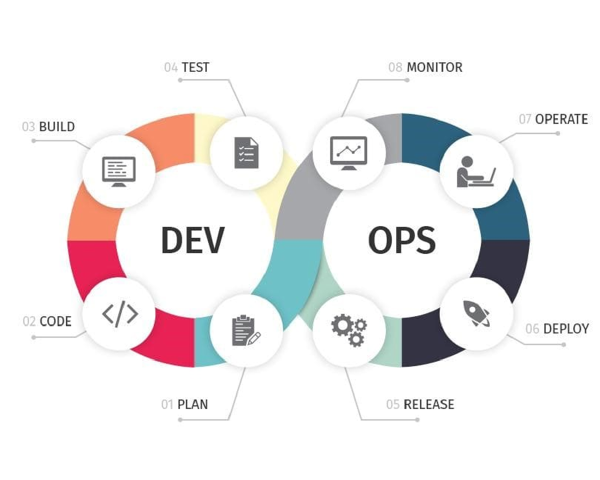
When I talk about DevOps, I usually don’t focus on the things like pipelines or automation. While these topics and activities can be part of DevOps, there is so much more to it. I’m sure this will be a multipart blog series so lets get started.
The Definition # Let’s make sure we are all on the same page. The definition of DevOps that I love and subscribe to was coined by Donovan Brown at Microsoft.
A common issue I see when discussing DevOps with teams or organizations is the presence of Organizational Silos. Organizational Silos are made up of all types of people. Sometimes its a job type, like developers, qa, or infrastructure. Sometimes its a department, like accounting, or hr. Whatever the composition of these silos, they usually impact organizational performance and the ability to deliver value to end users.
This happens over time, with members of the silo identifying with each other, viewing those not in the silos as outsiders. Depending on the business, the silos can lose trust in the business overall and tighten ranks around their silo. The silos can turn into walled fortresses. When the silos get in the way, the silos are more focused on their own success than the success of the organization.