Something I found out after moving from WordPress to GitHub Pages is that out of the box you can only host a single domain for a repository with GitHub Pages. This is a problem for me because I have a number of domains I was hosting at WordPress that I wanted to point at my GitHub Pages.
Official Docs and the limitation#
So officially, GitHub pages doesn’t support multiple domains. The docs here https://docs.github.com/en/pages/configuring-a-custom-domain-for-your-github-pages-site/troubleshooting-custom-domains-and-github-pages#custom-domain-names-that-are-unsupported state:
Make sure your site does not
*example.com* and *anotherexample.com*.
Use more than one www subdomain. For example, both *www.example.com* and *www.anotherexample.com*.
Use both an apex domain and custom subdomain. For example, both *example.com* and *docs.example.com*.This means for example, I can setup www.chris-ayers.com and chris-ayers.com for my repository and nothing else. If I want another domain to point to it, like chrisayers.me, I would probably need to fork the repository and setup the new repository for the additional domain.
So how do we solve this? There has to be another way. There is! We can use Cloudflare to redirect the additional domains to the GitHub Pages domain. It seems this has been an issue for everyone since 2018. I found a few articles that helped me figure this out:
- https://olney.ai/category/2018/07/30/ai.html
- https://medium.com/@desfocado/how-to-get-multiple-domains-pointing-to-github-pages-using-cloudflare-41fcb20ed10
Cloudflare#
Cloudflare is a DNS provider that has a free tier. It also has a feature called Page Rules that allows you to setup custom rules for your domain. This is what we will use to redirect the additional domains to the GitHub Pages domain.
Setup#
First, we need to setup Cloudflare. This is a pretty simple process. You just need to create an account and add your domain. You can do this by following the steps here: https://developers.cloudflare.com/fundamentals/get-started/setup/
- Create an account (if you don’t already have one)
- Add your domain
- I chose the free plan for each of my domains
- I reviewed all the entries and made sure they were correct (I removed most of them)
- I updated the DNS nameservers for my domain to the ones provided by Cloudflare
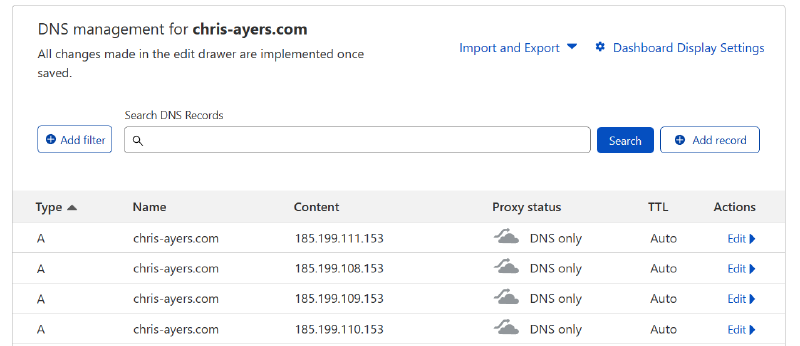
I decided that my primary domain would be https://chris-ayers.com. As part of the normal GitHub Pages DNS setup, you add the domain name to GitHub Pages then add A records to your DNS domain. The directions are in the GitHub docs. I’ve added the needed A records to my domain on CloudFlare.
Next I need to setup my other domains. For each domain, I added it to Cloudflare. I then setup 3 CNAME entries. Let’s look at my configuration for chrisayers.dev as an example. I setup the following CNAME entries:
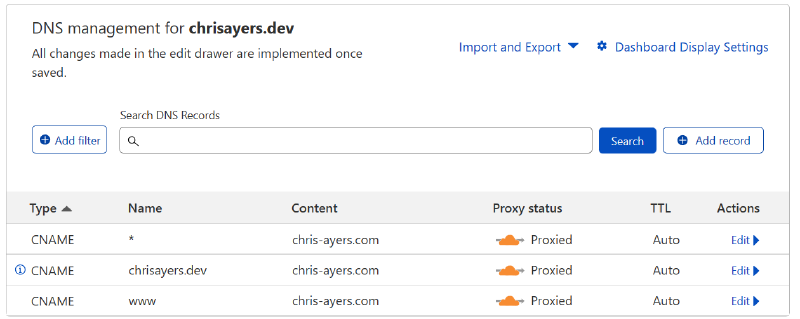
With this configuration, I’m saying that pretty much everything should point to https://chris-ayers.com.
| Type | Name | Content |
|---|---|---|
| CNAME | * | chris-ayers.com |
| CNAME | chrisayers.dev | chris-ayers.com |
| CNAME | www | chris-ayers.com |
Now I need to setup the Page Rules. These are main thing that makes it all work.
Cloudflare Page Rules#
This is where it gets a little more complicated. Continuing with my example before, adding chrisayers.dev, I setup the following Page Rules:
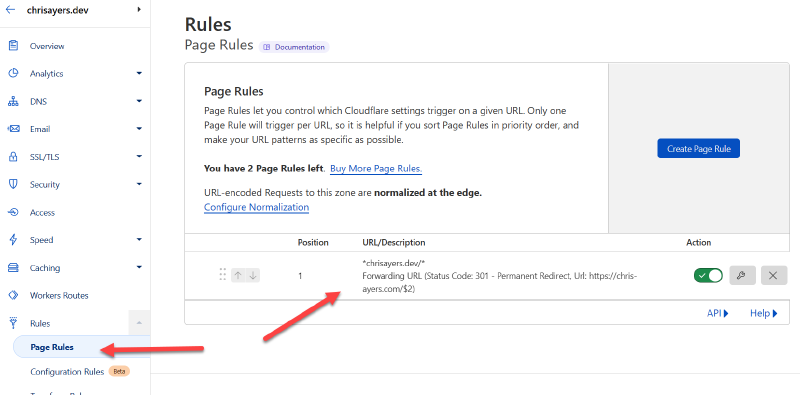
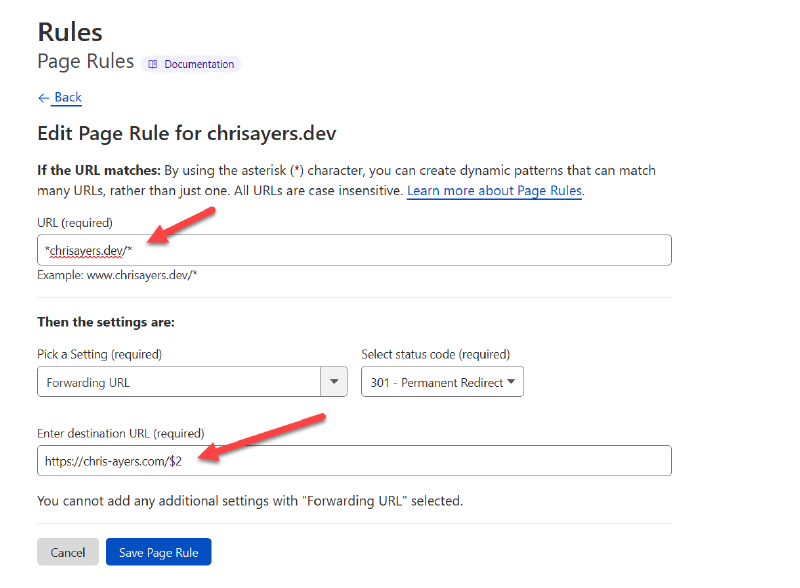
The main thing is to note the special characters (*) and variables in the rules.
| Field | Value |
|---|---|
| URL (required) | *chrisayers.dev/* |
| Forwarding URL | 301 - Permanent Redirect |
| Destination URL | https://chris-ayers.com/$2 |
After a little bit, everything should redirect to the GitHub Pages domain and work. I was fiddling a lot for the first domain or two, and they took a little while to start working. I’m not sure if it was just a propagation issue or what. But after a few hours, everything started working.
The other domains I did (I have around 10) were pretty quick. I think it was just the first ones that took a while because I was trying to figure out the process.
Conclusion#
I’m pretty happy with the results. I was able to get all my domains to point to my GitHub Pages site. I’m not sure if this is the best way to do it, but it works. I’m sure there are other ways to do it, but this is the way I figured out. I hope this helps someone else out there.