This is part 1 of the MARP series. You can read the series of articles here:
- Marp - Create Presentations with Markdown
- Unleash Your Creativity with Marp Presentation Customization
Introduction#
Marp is a powerful and user-friendly presentation framework that simplifies the process of creating visually appealing slide decks using Markdown. In this blog post, we’ll explore what Marp is, why you might want to use it, how to get started. I’ll share my process and show you how you can automate hosting your presentations on GitHub Pages using GitHub Actions.
What is Marp?#
Marp is an open-source presentation framework that allows you to create beautiful, customizable slide decks using the simplicity and flexibility of Markdown. By harnessing the power of Markdown, Marp enables you to focus on your content and message without getting bogged down in complex formatting and design choices. Marp has CLI and VS Code extensions, and it supports exporting presentations to various formats, including HTML, PDF, and PowerPoint.
Why Use Marp?#
There are several reasons why you might want to consider using Marp for your presentations:
- Simplicity: Marp allows you to write your presentations in plain text using the intuitive Markdown syntax, which is easy to learn and use.
- Focus on content: With Marp, you can concentrate on your message and content without worrying about complex formatting and design choices.
- Customizable: Marp offers a range of customization options, allowing you to create presentations that align with your personal style and preferences.
- Integration with Visual Studio Code: Marp seamlessly integrates with the popular Visual Studio Code editor, providing real-time previews and a smooth workflow for creating and editing presentations.
- Export options: Marp supports exporting presentations to various formats, including HTML, PDF, and PowerPoint.

Working with Marp#
For me, the ideal way to interact and work with Marp is through the Marp for VS Code extension. This extension provides a seamless workflow for creating and editing presentations in Visual Studio Code. It also offers real-time previews, allowing you to see your presentation as you write it.
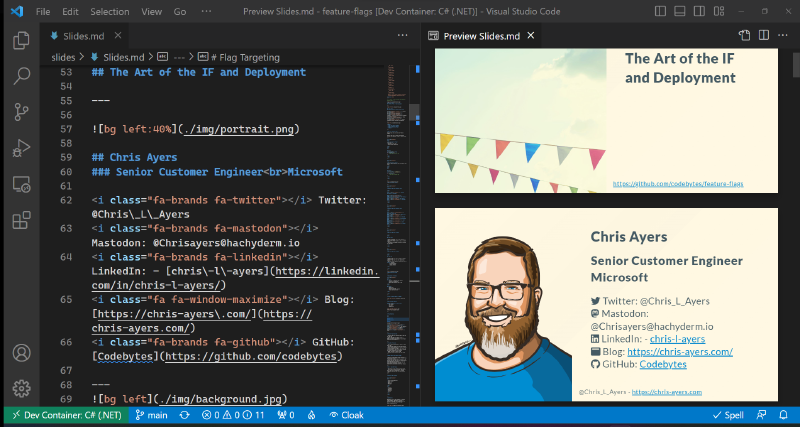
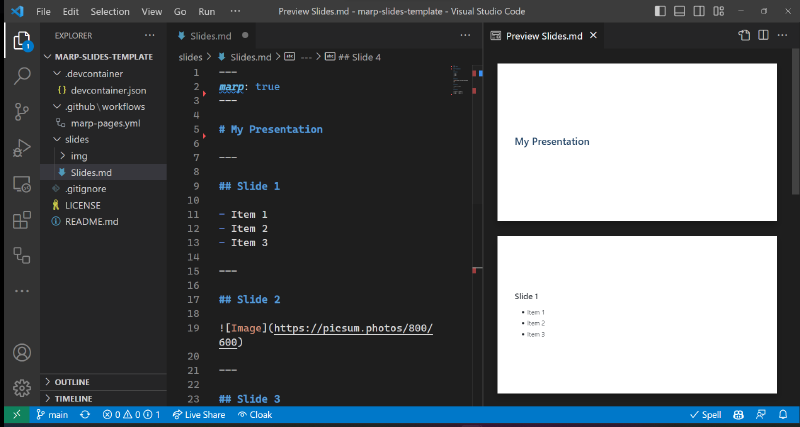
To get started, install the Marp for VS Code extension and open a new Markdown file. You can then start writing your presentation. A sample presentation is shown below:
---
marp: true
---
# My Presentation
---
## Slide 1
- Item 1
- Item 2
- Item 3
---
## Slide 2

---
## Slide 3
> This is a quote.
---
## Slide 4
| Column 1 | Column 2 |
| -------- | -------- |
| Item 1 | Item 2 |
| Item 3 | Item 4 |Once you’ve added the content to VSCode with Marp, your presentation will look like this:
Official Themes and Resources#
Marp comes with a few built-in themes that you can use as a starting point for your custom themes or as inspiration for your own designs. You can also refer to the Marpit documentation for more information on styling Marp presentations. There is good documentation on image sizing and positioning on the Marp site.
GitHub Pages and Marp#
I have created a GitHub repository for each of my talks. For each talk, I have a slides folder that contains the Markdown files for the presentation. All images are stored in slides/img. I use GitHub Pages to host the HTML files, which allows me to share the presentation with others. I use a GitHub Actions workflow that automatically builds and publishes the presentation to GitHub Pages whenever I push changes to the slides folder. This workflow is shown below:
name: Deploy marp site to Pages

on:
  # Runs on pushes targeting the default branch
  push:
    branches: ['main']

  # Allows you to run this workflow manually from the Actions tab
  workflow_dispatch:

# Sets permissions of the GITHUB_TOKEN to allow deployment to GitHub Pages
permissions:
  contents: read
  pages: write
  id-token: write

# Allow only one concurrent deployment, skipping runs queued between the run in-progress and latest queued.
# However, do NOT cancel in-progress runs as we want to allow these production deployments to complete.
concurrency:
  group: 'pages'
  cancel-in-progress: false

jobs:
  # Build job
  build:
    runs-on: ubuntu-latest
    steps:
      - uses: actions/checkout@v3
      - name: Copy images
        run: mkdir build && cp -R slides/img build/img

      - name: Marp Build (README)
        uses: docker://marpteam/marp-cli:v1.7.0
        with:
          args: slides/Slides.md -o build/index.html --html
        env:
          MARP_USER: root:root
      - name: Setup Pages
        uses: actions/configure-pages@v3
      - name: Upload artifact
        uses: actions/upload-pages-artifact@v1
        with:
          # Upload entire repository
          path: 'build'
      - name: Deploy to GitHub Pages
        id: deployment
        uses: actions/deploy-pages@v1
Marp Template#
I’ve created a marp-slides-template, which provides a minimal template to create a Marp site that can be built and published on GitHub Pages. This template comes with a GitHub Pages / Actions workflow, allowing you to easily build and publish your Marp presentation on GitHub Pages. With this template, you can quickly create and customize your presentation, preview it in Visual Studio Code using the Marp extension, and then share it with the world by publishing it to GitHub Pages. You can use the template by clicking on the link or visiting the repository and clicking on the “Use this template” button.
Conclusion#
Marp is a powerful, flexible, and user-friendly presentation framework that simplifies the process of creating visually appealing slide decks. By harnessing the simplicity of Markdown and offering a range of customization options, Marp enables you to focus on your content and message without getting bogged down in complex formatting and design choices. With its seamless integration into Visual Studio Code and various export options, Marp is an excellent choice for anyone looking to streamline their presentation creation process. Check out the official documentation and repositories to get started on creating your next presentation with Marp today.
Resources#
Some of my Marp Presentations#
- Feature Flags
- GitHub Actions Demos
- Secure Terraform on Azure
- Build with Bicep
- Dotnet Configuration in Depth
- Dev Containers
Official Repos and Docs#
For more information on Marp and to dive deeper into its features and capabilities, check out the following resources:
CommonMark Markdown syntax: https://commonmark.org/help/
Marp Official Repository: https://github.com/marp-team/marp
Marp Official Documentation: https://marpit.marp.app/markdown
Marp for VS Code Documentation: https://marketplace.visualstudio.com/items?itemName=marp-team.marp-vscode