What is NuGet?#

NuGet is an essential packaging tool used in the .NET ecosystem. NuGet is how packages for .NET are created, hosted, and consumed, along with the tools for each of those roles. For many, NuGet is used through Visual Studio to install and manage packages.
The dotnet CLI also provides functionality for adding packages, updating packages, and creating packages.
NuGet has changed over the years, originally downloading packages into a project folder where they could be checked in. Today, we don’t typically check packages into our source control. This is where caching comes in.
NuGet Caches#
NuGet manages several folders outside of your project structure when installing, updating, or restoring packages. The locations of the folders vary by platform but the use case is the same. Microsoft has a detailed document on the caches: Managing the Global Packages and Cache Folders.
| Name | Description |
|---|---|
| global‑packages | This is where NuGet installs any downloaded package. |
| http‑cache | The Visual Studio Package Manager (NuGet 3.x+) and the dotnet tool store copies of downloaded packages in this cache (saved as .dat files), organized into subfolders for each package source. |
| temp | A folder where NuGet stores temporary files during its various operations. |
| plugins-cache | A folder where NuGet stores the results from the operation claims request. |
Viewing the cache locations can be done with the dotnet CLI or the nuget cli:
# Display locals for all folders: global-packages, http cache, temp and plugins cache
dotnet nuget locals all --list
nuget locals all -list
http-cache: C:\Users\user1\AppData\Local\NuGet\v3-cache
global-packages: C:\Users\user1\.nuget\packages\
temp: C:\Users\user1\AppData\Local\Temp\NuGetScratch
plugins-cache: C:\Users\user1\AppData\Local\NuGet\plugins-cacheWhy do we want to Clear the Caches?#
There are a few reasons you might want to clear caches.
- Maybe you’re seeing strange behavior in your builds. I’ve cleared all my caches to make sure I’m downloading the same versions as the build agent
- Upgrading versions of .NET. I’ve had errors (and warnings) from restoring packages into a new version of .NET that were restored in previous versions.
Clearing Caches#
To clear the caches, you can pick the method that works best for you.
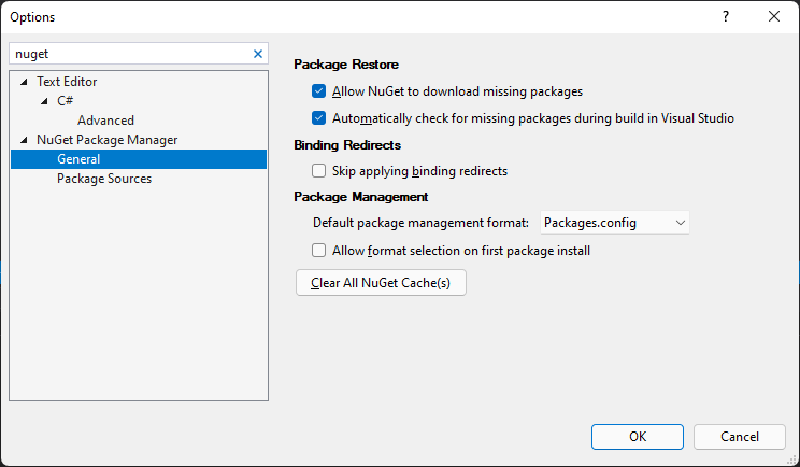
In Visual Studio 2017 and beyond, there is a button in the NuGet section of the options dialog (Tools->Options):
Using the dotnet or nuget CLI, you can clear specific caches or all caches. The commands are:
# Clear the 3.x+ cache (use either command)
dotnet nuget locals http-cache --clear
nuget locals http-cache -clear

# Clear the 2.x cache (NuGet CLI 3.5 and earlier only)
nuget locals packages-cache -clear

# Clear the global packages folder (use either command)
dotnet nuget locals global-packages --clear
nuget locals global-packages -clear

# Clear the temporary cache (use either command)
dotnet nuget locals temp --clear
nuget locals temp -clear

# Clear the plugins cache (use either command)
dotnet nuget locals plugins-cache --clear
nuget locals plugins-cache -clear

# Clear all caches (use either command)
dotnet nuget locals all --clear
nuget locals all -clear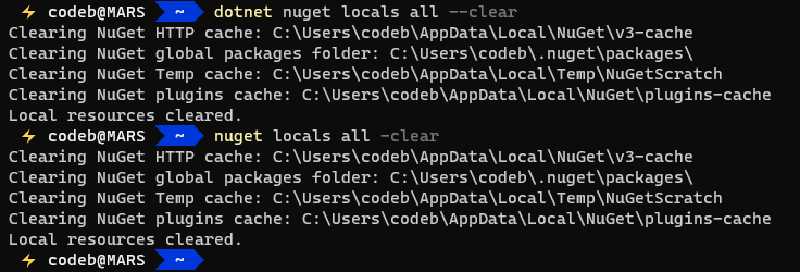
Installing NuGet.exe#
NuGet.exe is not installed by default on Windows. Visual Studio 2017 and above include nuget package manager functionality via the NuGet Package Manager (GUI and console), but not nuget.exe.
If you install newer versions of the DotNet CLI, it does include dotnet nuget funcationality but not nuget.exe.
The NuGet.exe doesn’t have an installer, and the instructions on the site usually involve downloading the exe and adding it to your path.
There are other ways to install NuGet.exe.
winget install Microsoft.NuGetchoco install nuget.commandline- I’ve got a script that downloads it and adds it to your path, you can find it here: Nuget-Install.ps1
Conclusion#
In conclusion, understanding and managing NuGet caches is essential for maintaining a healthy development environment, especially when dealing with build issues or upgrading .NET versions. Clearing caches can help resolve strange behavior in your builds and ensure consistency with build agents. With the methods outlined in this post, you can easily clear specific or all caches using Visual Studio, the dotnet CLI, or the nuget CLI. By mastering these cache management techniques, you’ll be well-equipped to tackle any cache-related challenges that come your way, ultimately contributing to a more efficient and reliable development process.