The catalog looks wrong. Before changing the API, you want to answer a smaller question: are the expected products actually in its database?
Logs tell you what the application reported. A database query lets you inspect the stored rows directly. Aspire 13.6.4 can open an opt-in PostgreSQL client beside the dashboard, without making you find a port, install psql, or copy a password.
The main exercise in this part of Aspire Field Notes is straightforward: open the catalog’s database client, inspect the three seeded products, and close the client. An optional terminal tape makes those same stored-data checks repeatable. The sample does not deliberately corrupt data or reproduce a new failure; its known seed gives you a baseline for that diagnostic workflow.
Start with the catalog#
Use Aspire CLI and AppHost SDK 13.6.4 with the companion’s .NET 10 SDK and Node.js prerequisites. The sample README has the setup; run the commands below from aspire-field-notes/.
Use the catalog AppHost from part two, with a running Docker or Podman engine and the README’s one-time postgres-password secret setup. You do not need a local psql installation.
Select the catalog AppHost explicitly so the commands do not depend on your current CLI selection. If your catalog is already running without REPL support, stop that run with aspire stop --apphost catalog/Catalog.AppHost/Catalog.AppHost.csproj before starting it with the opt-in flag below.
Inspect PostgreSQL without moving its password#
Start the catalog with REPL support enabled:
apphost=catalog/Catalog.AppHost/Catalog.AppHost.csproj
Diagnostics__EnableRepl=true aspire start --apphost "$apphost" --isolated
In the dashboard, wait for api to become Healthy, then choose postgres > Actions > REPL. API readiness matters here because the API seeds catalog_items before accepting traffic.
The catalog AppHost already contains this opt-in guard:
if (builder.ExecutionContext.IsRunMode && builder.Configuration.GetValue<bool>("Diagnostics:EnableRepl"))
{
    postgres.WithRepl();
}
It applies WithRepl() to the postgres server, not the catalogdb database. The flag enables the diagnostic command only for this local run; it is not a requirement for ordinary catalog startup.
The menu action opens the container’s bundled psql client in the dashboard dock, authenticated with the resource’s credentials. If the dock is hidden, press the backtick (`) key outside terminal input or a text field; use F6 to move focus out of terminal input first.1
The session starts in the postgres database, not the application’s catalogdb. Switch to catalogdb, then ask which database and role the client is using, which products are stored, and how many rows exist:
\connect catalogdb
BEGIN READ ONLY;
SELECT
    current_database(),
    current_user;
SELECT sku, name, price
FROM catalog_items
ORDER BY sku;
SELECT count(*) AS products
FROM catalog_items;
ROLLBACK;
\q
Expect current_database() to return catalogdb, the rows to contain the mug, notebook, and sticker, and products to be 3. These are database observations, not another call to /api/catalog.
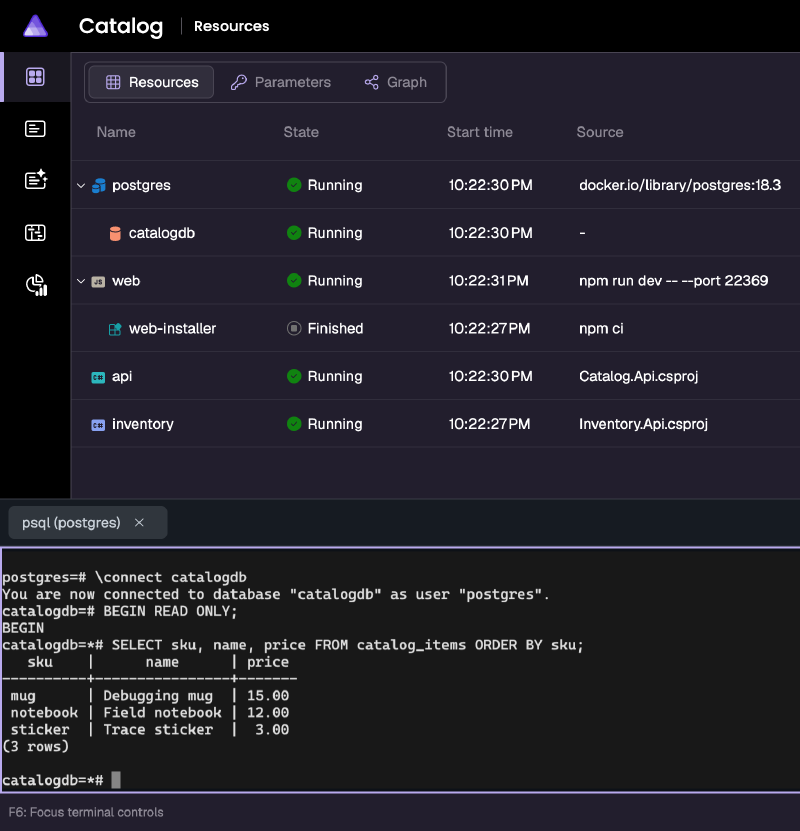
If the rows are missing or different, investigate the seed and stored state. If the expected rows are present but the frontend still behaves incorrectly, this query has narrowed the investigation; it has not proved that the API, inventory call, or frontend is correct. Use the request trace from part two for those questions.
The read-only transaction limits this example’s queries. It does not make the REPL a read-only security boundary: the same credentials may be able to modify or delete data in another transaction.
The final \q matters: closing the tab alone can leave psql alive inside the container.
Optional CLI alternative#
To automate readiness and open the same docked client without using the menu:
aspire wait api --apphost "$apphost" --status healthy --timeout 120 --non-interactive
aspire resource postgres repl --apphost "$apphost" --non-interactive
These are alternatives to the dashboard steps, not extra startup requirements. The REPL command does not attach your shell; switch to the dashboard to use the client. Running both the command and the menu action opens two sessions, and each needs its own \q.
A useful shortcut is also a permission#
REPL support is opt-in and local-run-only. It is available for PostgreSQL, MySQL, SQL Server, MongoDB, Redis, and Valkey in 13.6.2
Enable it only for people you intend to give the resource’s actual access. The default psql-client terminal described below also exposes database access during local runs. A remotely shared dashboard or tunnel changes who can reach these interfaces; it does not make either database client harmless.
For a repeated team operation, consider a resource command such as show-schema-version instead of a full database prompt. Its implementation still needs authorization and clear failure reporting.
Make the database check repeatable#
A terminal tape is a text script that waits for a prompt, types commands, and checks the resulting screen. Here, it asks this catalog database whether the expected products are actually stored.
The docked WithRepl() client cannot be a tape target. Tape playback joins a running resource configured with WithTerminal(), so the automated path needs a separate psql-client resource whose main process is psql. The PostgreSQL server remains a background service; attaching a terminal to the server would not turn it into a SQL prompt.3
Both clients inspect the same database, but they have different lifetimes. The REPL action creates an additional client inside the server container. The terminal-backed client is a normal local-run resource, with its own container and shared terminal input. Neither a tape nor closing a terminal viewer stops that resource.
A client that starts with the catalog#
The catalog AppHost includes psql-client by default in local run mode, alongside the API, frontend, and PostgreSQL server. No terminal opt-in flag is needed, and the client is excluded from published deployments. It uses the PostgreSQL server’s pinned image version, but runs psql instead of another database server. Aspire supplies the server address, port, user, and password through resource expressions; the database name comes from catalogdb. There is no local psql installation or password to copy.
These chained calls from the client definition wire its connection and terminal:
.WithEnvironment("PGHOST", postgres.Resource.Host)
.WithEnvironment("PGPORT", postgres.Resource.Port)
.WithEnvironment("PGDATABASE", catalogdb.Resource.DatabaseName)
.WithEnvironment("PGUSER", postgres.Resource.UserNameReference)
.WithEnvironment("PGPASSWORD", postgres.Resource.PasswordParameter)
.WithEnvironment("PGOPTIONS", "-c default_transaction_read_only=on -c statement_timeout=5000")
.WithEnvironment("PSQL_HISTORY", "/dev/null")
.WaitFor(api)
.WithTerminal(options =>
{
    options.Columns = 160;
    options.Rows = 30;
});
WithTerminal() is experimental in 13.6; the sample scopes its ASPIRETERMINAL001 warning suppression to this client block. The client disables the pager and history, avoids loading personal psql startup settings, and uses a stable CATALOG_READY> prompt.
A normal catalog start includes the client:
apphost=catalog/Catalog.AppHost/Catalog.AppHost.csproj
aspire start --apphost "$apphost" --isolated
Do not start a second run if this catalog AppHost is already running with the client. The earlier Diagnostics__EnableRepl flag is needed only for the optional docked REPL action, not for psql-client.
The client waits for api to become healthy, so the seeded rows exist before its prompt opens. Select psql-client > Console logs in the dashboard. Once running, the resource defaults to the Terminal view; if you selected it during startup and still see logs, choose Settings > Terminal.
This client starts in catalogdb, unlike the docked REPL. You can inspect it manually with the same SELECT statements above, without \connect. For tape playback, leave it running at an idle prompt with no partially typed input. Do not enter \q yet.
Check the actual catalog, twice#
Run the checked-in catalog-inspect.tape directly from aspire-field-notes/:
aspire wait psql-client --apphost "$apphost" --status up --timeout 120 --non-interactive
aspire terminal tape play psql-client \
  --apphost "$apphost" \
  --tape-file terminals/catalog-inspect.tape \
  --timeout 20 --non-interactive
Run the same playback command a second time. There is no Node helper, generated tape, or nonce-substitution step. The tape’s SQL runs inside a read-only transaction and checks:
- The connected database is
catalogdb. - The ordered SKUs are exactly
mug,notebook,sticker. - The table contains exactly three products.
SQL checks the actual database, count, and SKU array before emitting a fixed result marker. Only the expected baseline can produce the catalogdb_mug,notebook,sticker_3_PASS result; unexpected data produces a separate failure marker instead of echoing arbitrary stored text. The complete expected marker is not present in the typed SQL, so input echo cannot satisfy the assertion. The tape matches a complete result line, not an arbitrary substring.
The expected result is:
FIELD_NOTES_CATALOG_catalogdb_mug,notebook,sticker_3_PASSBefore querying, the tape clears the visible terminal and waits until the whole screen contains only the ready prompt and whitespace. That reset replaces the need for a nonce: an earlier result cannot satisfy the new check, and the unchanged tape can be replayed directly. If the screen does not clear, playback fails before running the SQL.
The reset sequence in the checked-in tape is:
Enter
Wait+Line /CATALOG_READY> *$/
Ctrl+L
Wait+Screen /^CATALOG_READY>[ \t\r\n]*$/
Check that a wrong expectation fails#
The separate negative-control tape first requires the real three-product baseline, then deliberately expects four in its result predicate. It does not add or remove a product:
aspire terminal tape play psql-client \
  --apphost "$apphost" \
  --tape-file terminals/catalog-inspect-negative.tape \
  --timeout 20 --non-interactive
This command should fail with CLI exit code 16 because its expected-PASS wait cannot match. The preceding wait must have observed FIELD_NOTES_CATALOG_catalogdb_mug,notebook,sticker_3_FAIL; confirm that playback failed at the last PASS wait, not an earlier prompt, reset, or result wait. The final screen should contain that FAIL result and no expected PASS. A missing prompt or broken connection does not demonstrate that the wrong-count assertion was rejected.
Both tapes roll back before the final assertion, so a failed output wait does not leave that transaction open. Output waits are bounded at five seconds, and the command above sets a 20-second playback timeout. The CLI prints the final screen and reports playback failures; there is no wrapper translating the negative command’s failure into a success exit code.
These checks make the known-seed baseline repeatable. They still do not prove which database an API request reached or that the frontend is correct.
Keep playback scoped#
The client defaults to read-only sessions, and the tape rolls back its transaction. Those defaults are not a permission boundary: the underlying credentials can still have write access. Keep credentials and sensitive query results out of shared terminals and recordings.
Playback shares input and terminal size with other viewers; coordinate before typing or running a tape. A small primary viewer can wrap the result marker and break the screen check. Playback does not take exclusive input ownership or stop the client afterward.3
Container startup output can arrive before the terminal attaches. Each tape begins with an empty Enter to regenerate the prompt, then uses Ctrl+L to clear the visible screen before checking the reset. The client keeps interactive line editing enabled so that key works. This is safe only at an idle prompt: do not run a tape with partially typed SQL or while another viewer is using the client.
psql-client stays running with the other local resources between tape runs. It is not an auto-reconnecting service: entering \q ends its main process. To play another tape after quitting, stop the exact catalog AppHost and start it again with the normal startup command above. Closing its viewer alone does not end psql.
Finish the experiment#
If you started a catalog AppHost for either path, stop only that run:
aspire stop --apphost "$apphost" --non-interactiveDo not use broad process-name cleanup on a machine where other applications may be running.
That is the practical point of this exercise: inspect stored data in context, without moving connection details between tools. It answers a database question, not every question about the application.
Walkthrough 03 has the exact commands for this catalog diagnostic.