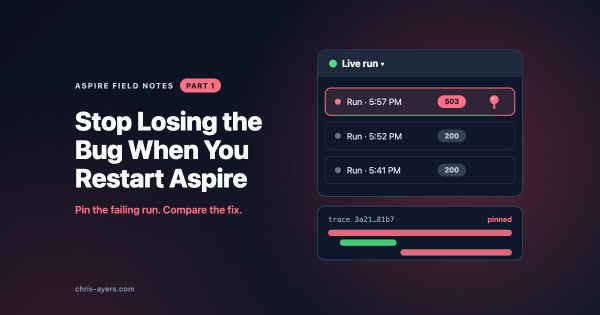
An agent can make a plausible fix and get a clean build without ever running the broken request.
Start with a smaller task: explain why Load catalog returns HTTP 503 while the services stay healthy. Require evidence from the request before changing code.
The earlier Field Notes posts established this developer loop. Now an agent follows it: run one request, inspect its trace, and retain the evidence. David Fowler’s developer-loop article explains why humans, scripts, and agents should work from the same application model.
The sample deliberately enables an inventory fault. We know the cause; the agent’s job is to demonstrate it, not hide the failure.
Start one failing catalog run#
Use Aspire CLI and AppHost SDK 13.6.4 with the sample README’s prerequisites: .NET 10, Node.js, and a running Docker or Podman engine. Run these commands from aspire-field-notes/ in a dedicated checkout or worktree.
If you own a catalog run from an earlier exercise, stop it first using its owning CLI or editor. Do not start a competing instance or stop another session’s AppHost.
Complete the README’s one-time PostgreSQL secret setup if needed, then start the catalog:
apphost=catalog/Catalog.AppHost/Catalog.AppHost.csproj
Inventory__FaultEnabled=true aspire start \
  --apphost "$apphost" --isolated --non-interactive
aspire wait web --apphost "$apphost" --status healthy --timeout 120 --non-interactive
aspire describe --apphost "$apphost" --format Table --non-interactive
The explicit AppHost path keeps each command on this checkout’s catalog. --isolated randomizes ports and isolates user secrets, not every mount, external dependency, or shared Aspire home file.
Wait for web, not just api: the request goes through Vite’s frontend proxy. These services have real health endpoints and dependency gates. Without a meaningful health check, a resource can satisfy a healthy wait merely by running.1
Use describe for resource health; ps lists AppHosts. Keep the inventory in Table format: JSON can expose passwords inside connection strings even when secret variables are redacted.
If startup or readiness fails, stop here and report that blocker. It is not the intentional request failure.
Give the agent one request#
With the catalog running, give the agent this bounded task. You do not need to run Load catalog yourself first.
Work only in this sample's checkout. Use Aspire CLI 13.6.4 and select
catalog/Catalog.AppHost/Catalog.AppHost.csproj explicitly.
The catalog is running with Inventory__FaultEnabled=true.

Inspect resource health with describe --format Table, then run once:
aspire resource web load-catalog \
  --apphost catalog/Catalog.AppHost/Catalog.AppHost.csproj \
  --non-interactive
Report its nonzero exit, HTTP status, problem title, and returned trace ID.

Reject a missing or empty trace ID. Query aspire otel spans and
aspire otel logs with --trace-id set to that ID, the same --apphost path,
--format Json, and --non-interactive. If telemetry is incomplete, repeat
only those queries for the same ID for at most 30 seconds.
Do not rerun the request.

Verify the API server, its successful PostgreSQL query, exactly one
inventory HTTP client, and that client's inventory server child.
Show span IDs, parent IDs, and HTTP statuses. Identify where 503
originated and distinguish inventory's problem title from the API's.
Correlate the fault setting with inventory and API warnings.

Identify the pinned dashboard run retaining this request. If viewing
or pinning needs a human action, report it as pending, not completed.
Stop after the evidence report and name any missing checks.

Do not edit code or configuration, disable the fault, add retries,
fake success, weaken checks, deploy, reset databases, delete volumes,
alter another session's processes, or reveal credentials.
Expected: that one GET /api/catalog through web returns HTTP 503, Inventory unavailable, and a trace ID. The CLI exits nonzero; the response includes dependencyStatus: 503. A missing trace ID or a different failure is a blocker, not a successful diagnosis. Do not hide it with || true.
The checked-in command reports the response and trace ID; it does not verify the trace. That is the agent’s next step. MCP is not required. If you use it, select this AppHost before invoking the same command with execute_resource_command.
Check the agent’s evidence#
To inspect its report yourself, copy the trace ID from the agent’s Load catalog result. Do not create another request:
trace_id="<trace ID returned by Load catalog>"
: "${trace_id:?Set trace_id to the trace ID returned by Load catalog}" && \
  aspire otel spans --trace-id "$trace_id" --apphost "$apphost" \
    --format Json --non-interactive && \
  aspire otel logs --trace-id "$trace_id" --apphost "$apphost" \
    --format Json --non-interactive
Keep the guard and both queries in one && chain. In interactive Bash or zsh, a failed standalone guard does not stop later pasted commands; an empty --trace-id can return unfiltered telemetry.
Telemetry export is asynchronous. If results are incomplete, wait a few seconds and repeat only these queries for the same trace ID, for at most 30 seconds. Another Load catalog call creates a different request, not more evidence for this one. After the deadline, report what is missing.
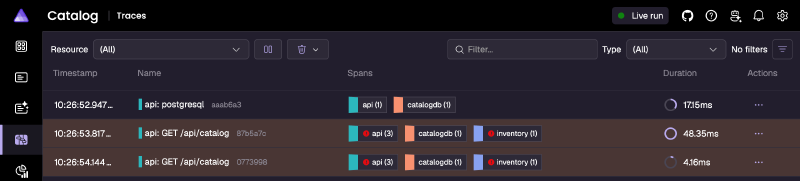
The API reads PostgreSQL first, then makes one inventory request without retries. The expected trace has four spans: the API server, its database query, an inventory HTTP client, and that client’s inventory server child.
Inspect the span IDs and parent IDs, not just four matching names. The database query and inventory HTTP client are children of the API server span; the inventory server span is a child of that client span. All belong to the returned trace ID. The database query should complete, while the three HTTP spans report 503.
The inventory service originates the 503 when Inventory:FaultEnabled is true. Its problem title is Intentional inventory outage; its warning says Intentional inventory failure: returning HTTP 503. The API then logs Inventory returned HTTP 503; no retry and returns its own Inventory unavailable problem. Those are two different responses in the same request chain.
The fault leaves inventory’s /health unaffected. Resource health does not prove that a business operation succeeds.
The dashboard’s Traces page shows the same kind of evidence, with errored spans marked:
Before the handoff or shutdown, open the live dashboard’s resource inventory and Console logs for api and inventory, then pin the failing run as described in part one. Viewing those console streams retains them in the run’s history; reading them only with aspire logs does not. Structured logs and traces are stored independently.
If the agent cannot perform these dashboard actions, complete them yourself or mark retained evidence as pending.
Record which dashboard run you pinned. CLI telemetry queries read the live run; selecting a historical run in the browser does not redirect them.
Require an evidence handoff#
A report saying “all resources are green” is incomplete. Require these concrete observations:
| Evidence | What to record |
|---|---|
| Scope and readiness | Checkout, AppHost, CLI/SDK versions, fault setting, and web, api, and inventory health |
| Request result | Request through web, nonzero exit, HTTP 503, problem title, dependencyStatus, and trace ID |
| Downstream chain | Span IDs, parent IDs, and HTTP statuses proving the successful database query and exactly one inventory call |
| Diagnosis | Where the 503 originated, with inventory and API warnings showing propagation without retry |
| Retained evidence | Pinned run identifier and availability of inventory, console logs, structured logs, and trace |
| Limits | Missing evidence, unperformed checks, and confirmation that no repair or destructive cleanup was attempted |
Record observations, not a copy of the expected findings. Missing spans, a timeout, or a different problem title limit the conclusion. A clean build cannot prove that the inventory call happened.
After retaining the evidence, stop only the catalog run you started:
aspire stop --apphost "$apphost" --non-interactiveThe companion’s optional build and regression checks are separate from this investigation. They do not prove that this request reached inventory once or that the live 503 matched the intended fault.
Optional: rebuild after an authorized change#
This investigation stops before a repair. For a later task that authorizes code changes, discover the resource’s commands:
aspire resource api --help --apphost "$apphost"The dashboard’s Actions menu shows the same choices:
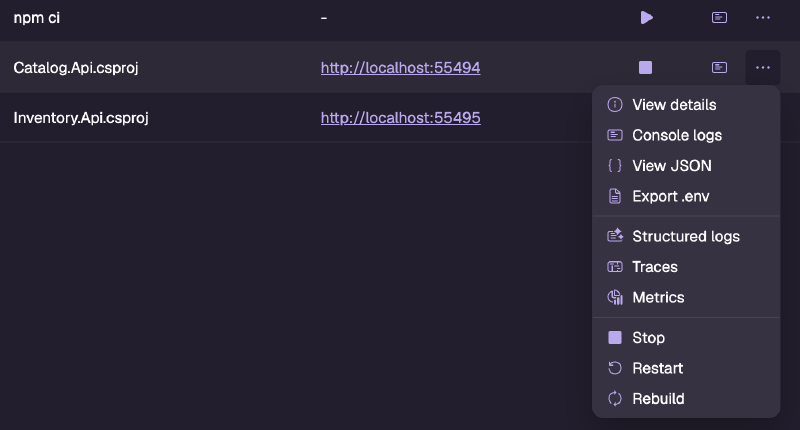
restart does not recompile source. After an authorized API change, use rebuild, wait for readiness, and repeat the operation with its expected outcome. For an AppHost model change, restart through its owning lifecycle tool. Turning off this walkthrough’s fault is a separate recovery exercise, not an agent repairing an unknown bug.
Optional: install Aspire guidance#
Skills teach the agent how to use tools; runtime commands supply observations. Skip setup if your agent already has the guidance it needs. My skills and plugins guide explains that distinction.
In 13.6.4, aspire agent init installs selected skills, while new MCP configuration is an explicit opt-in.2 Walkthrough 04’s optional setup targets the catalog workspace, chooses named workflow skills and the github location, and passes --mcp=false. Review generated catalog/.github/skills/ before adopting it; do not enable remote skill fetching or override aspireSkillsVersion for this exercise.
The location scopes skill files, not every setup side effect. The tagged 13.6.4 implementation still registers user-level telemetry hooks for detected supported Copilot and Claude Code clients. ASPIRE_CLI_TELEMETRY_OPTOUT=true suppresses transmission while set; it does not prevent hook registration, and setting it for setup alone does not disable later hook executions. Accept those changes explicitly or use a disposable user profile.3
Also check setup’s scope:
standardalso writes user-level~/.agents/skills;githubdoes not.--mcp=falseskips new MCP configuration, not existing connections or deprecated workspace configuration migrations.- Named skills avoid unrelated optional tooling selected by
--skills all. Re-running setup with fewer locations or skills is not a general uninstall mechanism; inspect what remains.
Keep access narrower than the diagnosis#
This sample uses unauthenticated local HTTP. Do not expose its app, dashboard, or terminals to untrusted users. A resource command, terminal, environment export, or persisted dashboard database can expose credentials and data beyond this task; review and redact evidence before sharing it.
The result of this exercise is a diagnosis you can review: one failed request, its real downstream chain, and an explicit account of what remains unverified.
aspire startscoping and isolation andaspire waitreadiness conditions. ↩︎Verified against Aspire 13.6.4’s tagged skill locations, agent initialization, and user-level hook configuration. The CLI telemetry reference describes transmission and opt-out. ↩︎