Understanding AI and Prompting Techniques Part 1#
Artificial Intelligence (AI) has rapidly evolved from science fiction to an integral part of our daily lives, transforming how we interact with technology and reshaping industries worldwide. Whether you’re using ChatGPT to draft emails, asking Copilot to write code, or generating images with DALL-E, understanding how to effectively communicate with AI systems has become an essential skill.
In this first part of our series, we’ll explore foundational concepts of AI, machine learning, deep learning, and generative AI, then dive deep into the art of prompting-the key to unlocking AI’s full potential.
Table of Contents#
What is AI?#
Artificial Intelligence is a branch of computer science dedicated to creating intelligent machines capable of performing tasks that typically require human intelligence. These tasks include problem-solving, decision-making, language understanding, and perception.
Evolution of AI#
AI has evolved through distinct phases, each building upon the previous:
- 1950s - Artificial Intelligence: The foundational era where pioneers like Alan Turing and John McCarthy laid the groundwork for machines that could simulate human reasoning and problem-solving.
- 1980s-1990s - Expert Systems: Rule-based systems that captured human expertise in specific domains, marking the first practical AI applications.
- 1997 - Machine Learning Breakthrough: IBM’s Deep Blue defeated world chess champion Garry Kasparov, showcasing the power of algorithms that could learn and improve.
- 2012 - Deep Learning Revolution: The ImageNet competition demonstrated that neural networks with multiple layers could dramatically outperform traditional methods in image recognition.
- 2017 - Transformer Architecture: The introduction of the “Attention Is All You Need” paper revolutionized natural language processing, leading to modern AI models.
- 2022-2024 - Generative AI Explosion: Models like ChatGPT, GPT-4, and Claude brought AI to mainstream audiences, enabling creation of text, images, code, and more from simple prompts.
Key AI Terms#
To effectively engage with AI, it’s essential to understand some fundamental terms.
AI Models#
AI models are the engines that power modern artificial intelligence. A model is a system trained on large datasets to recognize patterns, make predictions, or generate new content. The quality and capabilities of an AI system depend heavily on the underlying model.
How Models Work#
- Training: Models are trained using vast amounts of data and advanced algorithms.
- Learning Patterns: Through training, models learn to identify trends, relationships, and structures in data.
- Making Predictions: Once trained, models can process new data to make predictions, classify information, or generate content.
Popular AI Models (2025)#
| Company/Organization | Model | Specialization | Key Features |
|---|---|---|---|
| OpenAI | GPT-4o, GPT-4o mini, o1 | Language, reasoning | Advanced reasoning, multimodal capabilities |
| Microsoft | Phi-4, Copilot | Code, productivity | Optimized for efficiency, integrated tools |
| Anthropic | Claude 3.5 Sonnet, Claude 3.5 Haiku | Conversational AI | Constitutional AI, safety-focused |
| Meta | Llama 3.1, Llama 3.2 | Open-source language | Available for research and commercial use |
| Gemini Pro, Gemini Ultra | Multimodal AI | Strong integration with Google services | |
| DeepSeek | DeepSeek-R1 | Reasoning | Specialized in logical reasoning tasks |
These models differ significantly in their architecture, training data, and intended use cases. For example:
- GPT-4o excels at complex reasoning and multimodal tasks (text, images, audio)
- Claude 3.5 Sonnet is known for its helpful, harmless, and honest responses
- Phi-4 is optimized for efficiency while maintaining strong performance
- Llama 3.1 offers powerful open-source alternatives for developers
“The choice of model determines the capabilities and limitations of your AI-powered application.”
Tokens: The Language of AI#
Tokens are the fundamental units that AI models use to process and understand language. Think of tokens as the “words” in AI’s vocabulary, though they don’t always correspond directly to human words.
Understanding Tokenization#
When you submit text to an AI model, it first breaks your input into tokens through a process called tokenization. Here’s what you need to know:
- Size: One token roughly equals 4 characters of English text
- Conversion: 100 tokens ≈ 75 English words
- Variability: Common words might be single tokens, while rare words or technical terms might be split into multiple tokens
- Languages: Different languages have different tokenization patterns (e.g., Chinese characters often require more tokens per word)
Why Tokens Matter#
Understanding tokens helps you:
- Optimize prompts: Stay within model token limits
- Manage costs: Many AI services charge per token
- Improve efficiency: Craft concise prompts that convey maximum information
Token Limits in Practice#
Most AI models have token limits for both input and output:
- GPT-4o: Up to 128,000 input tokens
- Claude 3.5 Sonnet: Up to 200,000 input tokens
- Gemini Pro: Up to 1,000,000 input tokens
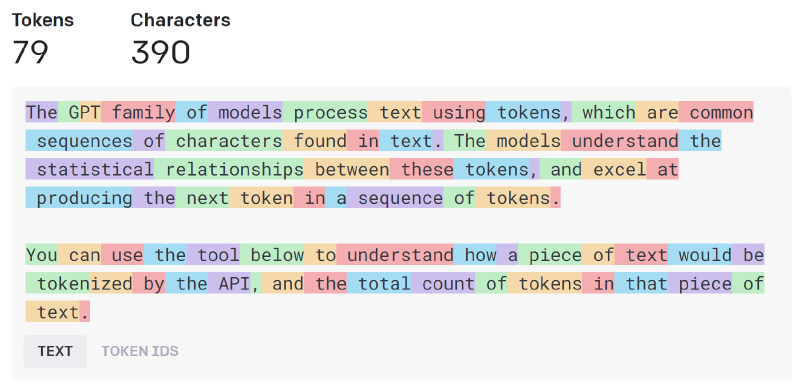
Pro Tip: Use online token counters to estimate your prompt length before submitting to AI models, especially for complex tasks or long documents.
Prompting#
Prompting is the art of communicating with AI models to achieve useful and relevant responses. The effectiveness of a prompt depends on clarity, context, and the role you assign to the model. Well-crafted prompts can dramatically improve the quality and relevance of AI outputs.
Why Prompting Matters#
- Clear prompts reduce ambiguity and help the model understand your intent.
- Providing context ensures the AI tailors its response to your needs.
- Assigning roles guides the model’s tone, expertise, and style.
Components of a Good Prompt#
| Component | Description | Example |
|---|---|---|
| Instruction | What you want the AI to do | Summarize this article in 3 sentences. |
| Context | Background or specifics | The article is about renewable energy trends in 2025. |
| Role | Persona or expertise | You are an energy policy analyst. |
| Format | Desired output style | Respond in bullet points. |
| Constraints | Limits or requirements | Use no more than 100 words. |
Practical Prompting Tips#
- Be specific: Vague prompts lead to vague answers. Specify what you want.
- Add context: Include relevant details, such as audience, purpose, or scenario.
- Set a role: Tell the AI who it should act as for more targeted responses.
- Request a format: Ask for lists, tables, or summaries if needed.
- Iterate: Refine your prompt if the output is not what you expect.
Prompting Examples#
Without context:
“Write an email inviting people to a meeting.”
With context and role:
“You are a project manager at Contoso. Write a formal email inviting the Azure Reliability team to a kickoff meeting next Thursday at 2 PM ET to discuss outage analysis improvements using AI.”
The second prompt produces a much more targeted and useful response because it provides:
- Role clarity: Project manager perspective
- Specific context: Company name, team, meeting purpose
- Clear details: Date, time, topic
- Tone guidance: Formal communication
The Power of Context and Roles#
Why Context Matters#
Context provides the background information that transforms generic AI responses into tailored, relevant outputs:
- Audience awareness: Specify who will read/use the output (executives, developers, students)
- Purpose clarity: Define what you want to achieve (inform, persuade, educate, troubleshoot)
- Constraints: Include relevant limitations (time, budget, technical requirements)
- Domain specifics: Provide industry or technical context when needed
Effective Role Assignment#
Assigning roles gives the AI a persona and expertise focus:
- Professional roles: “You are a cybersecurity expert,” “Act as a technical architect,” “Respond as a UX designer”
- Communication styles: “Explain like I’m 5,” “Use formal business language,” “Write in a conversational tone”
- Perspective shifts: “From a customer’s viewpoint,” “Consider the developer experience,” “Think like a project manager”
Example of role impact:
Generic prompt: “How do I optimize this SQL query?”
Role-specific prompt: “You are a senior database administrator. Review this SQL query for a high-traffic e-commerce site and suggest optimizations that prioritize read performance while maintaining data consistency.”
Advanced Prompting Techniques#
Beyond the basics, here are some powerful techniques for getting better results:
Chain of Thought Prompting#
Ask the AI to “think step by step” or “show your reasoning”:
Analyze this code for security vulnerabilities. Think step by step:
1. First, identify potential input validation issues
2. Then, check for authentication and authorization flaws
3. Finally, look for data exposure risks
Few-Shot Learning#
Provide examples of the desired output format:
Convert these technical terms to plain English:

API → Application Programming Interface (a way for software to communicate)
SDK → Software Development Kit (tools for building apps)
Docker → [Your task: explain this term]
Prompt Chaining#
Break complex tasks into smaller, sequential prompts:
- “Summarize this 50-page document into key themes”
- “For each theme, identify 3 actionable recommendations”
- “Create a presentation outline based on these recommendations”
Understanding AI Model Limitations#
While AI models are powerful, it’s crucial to understand their limitations:
Statelessness and Memory#
Most AI models are stateless-they don’t remember previous interactions unless explicitly provided with conversation history. Each request is independent, which means:
- No persistent memory: The model won’t remember what you discussed earlier unless you include it in your current prompt
- Context windows: Models can only “see” a limited amount of text at once (their context window)
- Application responsibility: Chat applications maintain conversation history and send it with each new request
Other Key Limitations#
- Knowledge cutoffs: Models are trained on data up to a specific date and don’t know about events after that
- Hallucinations: Models may generate plausible-sounding but incorrect information
- Bias: Training data biases can influence model outputs
- Reasoning limitations: While improving, models can struggle with complex logical reasoning
Best Practice: Always verify important information from AI models, especially for critical decisions or factual claims. “Effective prompting combines clear instructions, relevant context, and well-defined roles to guide AI models toward your desired outcome.”
What’s Next?#
In this series, we’ll dive deeper into advanced prompt engineering techniques, including:
- Prompt patterns and templates for common use cases
- Multi-modal prompting with images, audio, and code
- Prompt optimization strategies for better performance
- Real-world case studies from software development, content creation, and data analysis
- Safety and ethical considerations in AI prompting
Whether you’re a developer looking to integrate AI into your applications, a content creator exploring AI-assisted workflows, or simply curious about maximizing your productivity with AI tools, the next part will provide practical techniques you can apply immediately.
“Mastering AI prompting is like learning a new language-the better you communicate, the more powerful the results.”
Stay tuned for Part 2, where we’ll put these concepts into practice with hands-on examples and advanced strategies!